
UK-Specific Technical SEO Audit Checklist to Help Scale Your Business
Search engines and AI crawlers cannot access a website with technical errors. No matter how well your content is written, it will be of no use if Google cannot understand what it is. These issues are not at the forefront, and you cannot do all the guesswork to diagnose them. In most cases, these warning signs are not noticed by businesses until the competitors take them over. It is becoming a more serious reality for UK websites in 2026.
AI crawlers like GPTBot influence visibility in AI-generated search experiences, and UK-specific issues like ICO consent banner and post-Brexit localisation complexity create technical problems that most of the audits miss to cover. Here comes an audit checklist to your rescue. With this ready-to-use technical SEO audit checklist for 2026, designed for sites in the UK, you can quickly uncover what hinders your rankings.
Technical SEO Audit Checklist: 18 Checks for UK Sites
Technical SEO issues rarely announce themselves loudly, but you can see the rankings declining, pages not indexed properly, traffic drops, and AI stops citing your website. Let’s dig into the technical SEO audit checklist for UK sites:
Technical SEO Audit Checklist Point 0: Tools Needed
For a comprehensive technical audit, you need to see your website through Google’s lens. This cannot be attained without tools that retrieve search engine data, site crawlers, and performance analysers.
Free Tools (Vitals)
This free technical SEO toolkit serves multiple purposes, with details given below:
Google Search Console
Google Search Console (GSC) analyses your website’s performance in searches. Check the indexing of your pages, look for blocked, broken or non-indexed pages. Also, look for loading speed and layout; check individual URLs for canonicals.
Google PageSpeed Insights
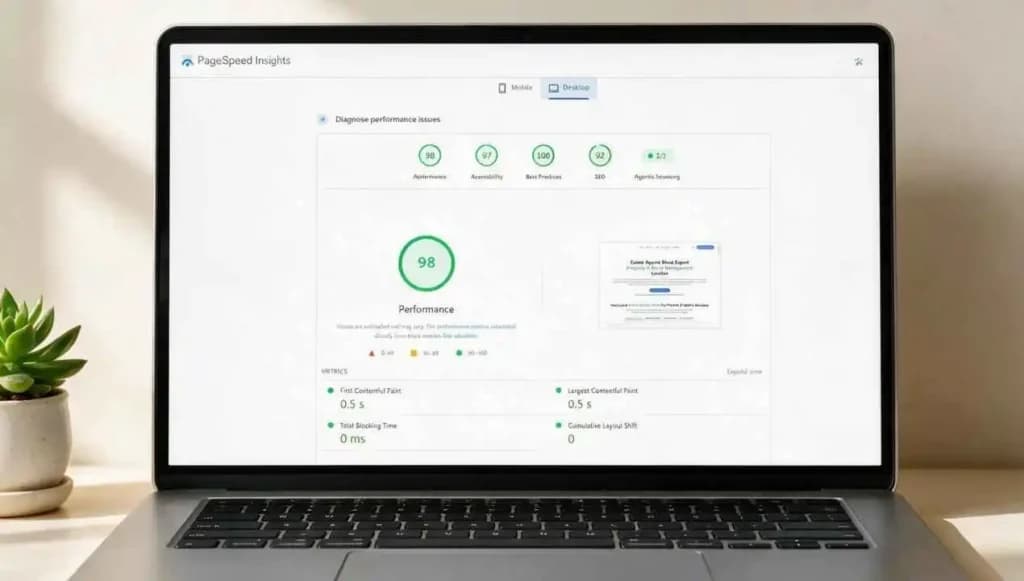
Google PageSpeed Insights tells how fast and stable your website is on desktop or mobile for users. Check for
- LCP (largest Contentful Paint) measures loading speed
- CLS (Cumulative Layout Shift) detects sudden layout movements
- INP (Interaction to Next Paint) checks responsiveness.
Chrome DevTools
Chrome DevTools inspects how a page loads and technical issues affecting performance. Check Lighthouse audits, network tab and security tab for large files and HTTPS or SSL issues.
Bing Webmaster Tools
Bing Webmaster Tools gives extra visibility into how search engines crawl your site beyond Google. Do a quick site scan, crawl data and analyse referring domains and link quality.
Paid Tools (Advanced)
Paid SEO tools identify problems faster and more deeply than manual audits. Choosing the right tool depends on your website size, technical needs and budget. A comparison table is given below:
| Tool | Best For | UK Price/month (Starting point) | Free Trial |
| Screaming Frog | Full crawl | £199/yr | Up to 500 URLs |
| Sitebulb | Visual audits | £11/month | 14-Day trial |
| Semrush Site Audit | Ongoing monitoring | £100/month | 7-Day trial |
| Ahrefs Site Audit | Combined audit & backlinks | £24/month | Limited tools with terms & conditions |
Technical SEO Audit Checklist Point 1: Is Your Site Accessible for Google
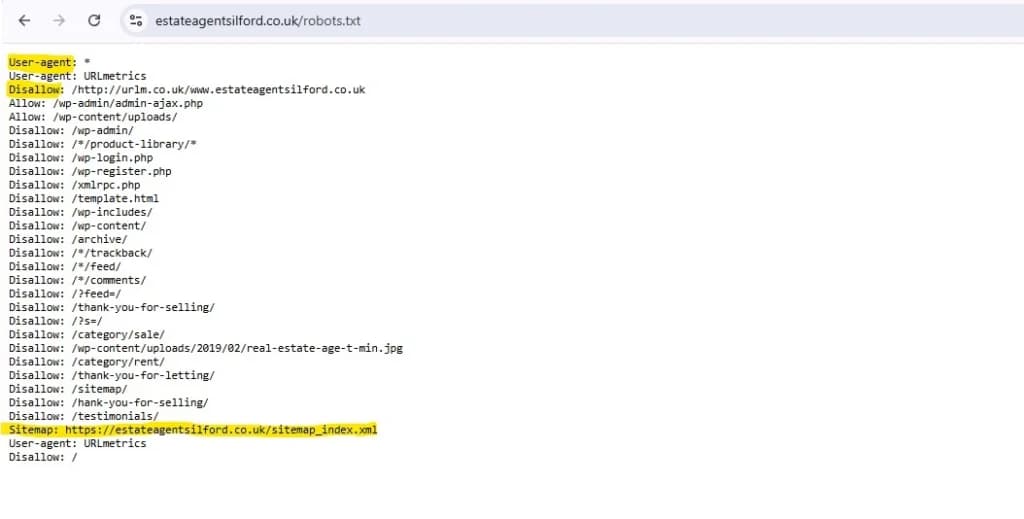
Your robots.txt file is the main line of communication between your website and search engines. In 2026, it has become more complex and has greater blowback if done wrong. Other than Googlebot and Bingbot, a whole new class of AI crawlers decides your visibility in ChatGPT responses, Perplexity citations, Google AI Overviews, and Gemini answers. Blocking them can make your site invisible in AI-led searches without a single GSC error.
For UK websites, in the post-GDPR UK web ecosystem, add blanket disallow rules that accidentally catch AI retrieval bots alongside the scrapers they were intended to block. Additionally, the ICO’s own compliance tools send automated crawlers to verify cookie banner implementation on UK websites. These bots should not be blocked; blocking them can affect your consent compliance audit trail.
AI Crawler
Not all AI bots are the same; the distinction is retrieval vs. training. Retrieval bots fetch your content to answer a specific user query; blocking them removes you from AI-generated answers. Training bots crawl your content to improve a future model; you receive no traffic or citation benefit from allowing them, and blocking does not affect your current AI search visibility at all.
Inspect
- Googlebot and Bingbot have access to all important pages and resources
- XML sitemap is correctly referenced at the bottom of your robots.txt file
- AI crawler rules are intentional, not accidentally inherited from a plugin or security tool
- OAI-SearchBot and PerplexityBot are allowed if you want AI citation visibility
- GPTBot and CCBot are blocked if you do not want your content used for model training
- CSS, JavaScript, and image files remain crawlable, blocking these breaks from rendering for all bots
- Your cookie consent platform’s own crawler bot is not accidentally disallowed
How to Fix
Review your robots.txt file and create separate rules for training bots and retrieval bots. Allow bots responsible for citations while restricting bots you do not want training on your content. Test the file in Google Search Console and verify no important resources are blocked.
Tools
- Google Search Console
- robots.txt Tester
- Screaming Frog SEO Spider
Priority
- High
Technical SEO Audit Checklist Point 2: XML Sitemap Health
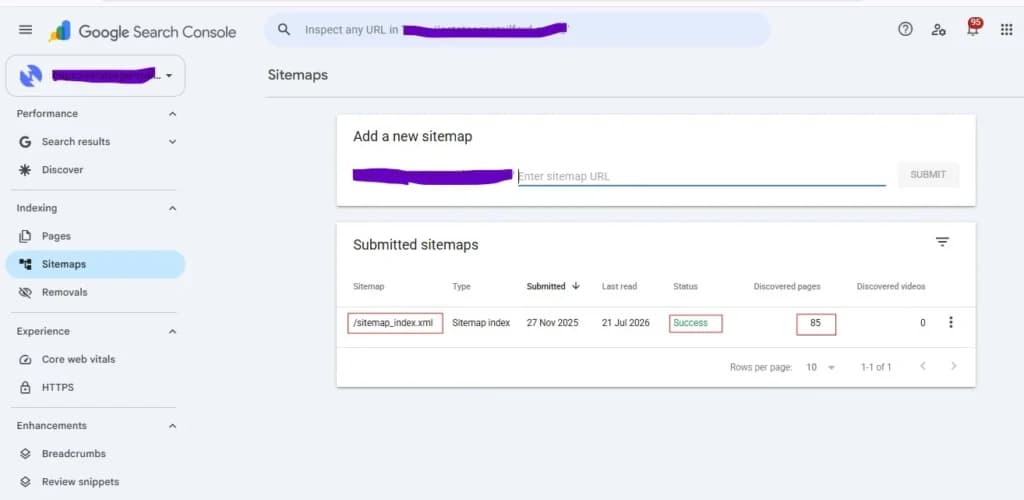
An XML sitemap helps search engines discover and prioritise important pages. A clean sitemap ensures that the crawl budget is allocated to the content and pages that matter. A poorly maintained sitemap can waste crawl budget and send incorrect signals about which URLs should appear in search results. The sites in the UK mostly submit their sitemaps only to Google Search Console and ignore Bing. A meaningful share of desktop search traffic in the UK is held by Bing, particularly among enterprise, B2B, and the Microsoft ecosystem. Recent desktop search data places Bing’s UK desktop market share at roughly 11–12%, significantly higher than its overall cross-device share.
Inspect
- Only canonical, indexable URLs are included.
- Every URL in the sitemap returns a 200 status code
- Sitemap updates automatically when new content is published
- Sitemap file size is within limits (50,000 URLs or 50MB per file; use a sitemap index for larger sites)
- Sitemap is submitted to both Google Search Console and Bing Webmaster Tools
How to fix
Generate your sitemap actively through your CMS or SEO plugin. If you are using WordPress, install Yoast SEO, Rank Math or All in One SEO, and they will produce sitemap updates on publish. In Shopify, the sitemap at /sitemap.xml is generated automatically. Run your sitemap through Screaming Frog after migration or redesign, and it will identify the URLs returning non-200 status codes so you can remove them before resubmission. Submit the updated sitemap to GSC and Bing.
Tools
- Google Search Console
- Bing Webmaster Tools
- Screaming Frog SEO Spider
Priority
- High
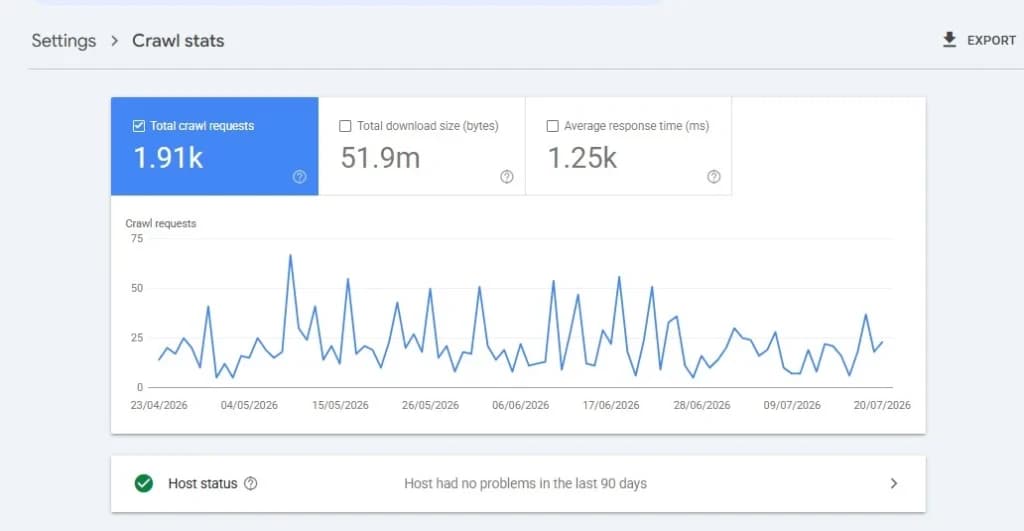
Technical SEO Audit Checklist Point 3: Crawl Budget & Log File Analysis
Crawl budget determines how often search engines visit your pages. In 2026, it is not just confined to GoogleBot, AI crawlers, including GPTBot, ClaudeBot, PerplexityBot, OAI-SearchBot, etc, hit UK websites regularly. As a result, the crawl inefficiencies now compound faster.
If a significant share of your overall crawl is being spent on low-value or dead URLs, your most important pages, like new product listings, updated content, and recently migrated sections, are waiting to be discovered and re-indexed. The three most consistent crawl budget drains on UK sites are WooCommerce filter combinations, WordPress tag and author archives, and legacy /amp/ URLs.
Inspect
- Percentage of total crawl activity spent on low-value URLs (404s, thin pages, tag archives, filters)
- Crawl frequency on important pages: Make sure your highest-priority URLs are being crawled regularly.
- Excessive crawling of faceted navigation, pagination, or parameter-based URLs
- Server log activity broken down by bot, analyse how much of your crawl comes from AI scrapers vs. Googlebot
- Whether old /amp/ URLs are still being crawled despite AMP being deprecated
If 15% or more of your total crawl is going to URLs that return 404s, are noindexed, or are low-value parameter variations, you have a crawl budget problem. AI crawlers alone now account for between 5% and 15% of total bot traffic on many UK publisher and ecommerce sites.
How to Fix
Block low-value URL patterns in robots.txt. Remove deleted product URLs and tag pages from your sitemap immediately after deletion. Improve internal linking to priority pages.
Tools
- Screaming Frog Log File Analyser
- Apache / Nginx server logs
- Google Search Console
Priority
- High
Technical SEO Audit Checklist Point 4: Index Coverage
The index coverage report shows you where pages are in the discovery-to-indexing pipeline. Without this data, it is impossible to spot gaps in quality, crawl budget problems or technical errors. A noindex directive applied to a high-value commercial page is a common issue in most sites. It happens when the CMS or plugin updates reset page-level settings, or when an SEO plugin causes noindex to be applied at the template level across an entire page type.
Staging environments are also a consistent problem for UK agencies. A staging site at staging.yourdomain.co.uk or yourdomain.co.uk/staging/ left publicly accessible will frequently be indexed within weeks of launch, particularly if it contains internal links that Googlebot follows from the live site. This creates duplicate content at scale and can actively dilute rankings for the live versions of those pages.
Inspect
- The difference between the pages Google has discovered, crawled, and indexed and if the numbers match your site size.
- Accidental noindex directives on important pages
- Duplicate or near-duplicate URLs are being excluded from the index
- Indexed staging or development environments
- Run a crawl filtered for noindex responses and cross-reference the results against your most important pages
How to fix
Audit the excluded URLs section in Google Search Console and investigate the most common exclusion reasons. “Discovered but not indexed” and “Crawled but not indexed” account for the majority of coverage issues on most sites. Remove accidental noindex tags and block staging environments via robots.txt or password protection.
Tools
- Google Search Console
- Screaming Frog SEO Spider
Priority
- High
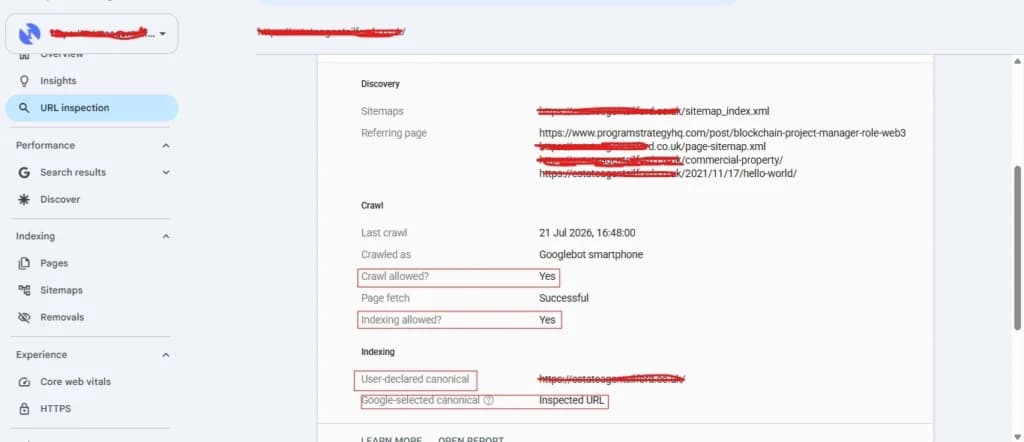
Technical SEO Audit Checklist Point 5: Canonicals & Duplicate Content
Canonical tags tell Google which version of a page should be treated as the definitive one; otherwise, Google makes its own determination that is often wrong. Google may choose a parameter URL, a paginated variant or an HTTP version. Incorrect and missing canonicals split ranking signals and create duplicate content issues that cannot be reversed without an audit.
Most UK sites that are also serving Irish and Australian audiences from the same domain misconfigure canonicals across regional content variants. This collapses all regional ranking signals into the UK version and actively prevents the Irish or Australian versions from appearing in their respective search markets.
Inspect
- Every indexable page has a self-referencing canonical pointing to its own preferred URL
- WWW and non-WWW versions of the domain redirect consistently to one preferred version
- HTTP redirects fully and permanently to HTTPS
- Canonical URLs use the correct protocol
How to fix
Run a full site crawl in Screaming Frog and export the canonicals report. Filter for pages where the crawled URL and canonical URL do not match. Ensure all canonicals use the HTTPS version of the URL. For WordPress sites using WPML or Polylang, check the plugin’s canonical output in a recent version and verify against the URL Inspection tool. Align all hreflang alternate tags with the canonical URLs for each regional variant.
Tools
- Screaming Frog SEO Spider
- Google Search Console URL Inspection
Priority
- High
Technical SEO Audit Checklist Point 6: JavaScript Rendering Audit
Google can render JavaScript in a secondary wave after initial crawling, which means content that exists after JavaScript executes may be invisible to Googlebot for days or weeks after a page is published. For UK ecommerce sites using modern JS-heavy themes, it creates a gap between what users see and what Google actually processes. In December 2025, a Google rendering update said that pages returning non-200 status codes are now excluded from the rendering queue entirely. This means rendering issues and status code issues are now directly linked; fixing one without the other achieves nothing.
Inspect
- Raw HTML and rendered HTML
- Key content, internal links, and metadata are present in the initial HTML response before any JavaScript fires
- Important text, navigation links, and structured data are visible in the source HTML
- Server-side rendering (SSR) vs. client-side rendering (CSR) setup
- Non-200 status pages in the rendering queue
- View Page Source and Inspect
How to fix
Run a page through Google Search Console’s URL Inspection tool and compare the rendered screenshot with what a user sees. Ensure content that must be present for SEO purposes is in the initial HTML response. Move to server-side rendering for key page templates. Any page currently returning a non-200 status should be fixed before rendering can be evaluated.
Tools
- Chrome DevTools
- Google Search Console URL Inspection
- Screaming Frog JavaScript Rendering mode
Priority
- High
Technical SEO Audit Checklist Point 7: Site Architecture & URL Structure
A clear site structure helps search engines understand page relationships and improves crawl efficiency. Poor architecture makes important pages harder to discover. Some UK websites mix ccTLDs and subfolders inconsistently, such as combining .co.uk domains with /en-gb/ folders.
Inspect
- Important pages reachable within three clicks
- Clean, readable URLs without unnecessary parameters
- Consistent folder structure
- Orphan pages with zero internal links
- Consistent localisation structure
How to fix
Simplify URL structures, improve navigation paths, and ensure all important pages receive internal links from relevant sections.
Tools
- Screaming Frog SEO Spider
- Sitebulb
Priority
- Medium
Technical SEO Audit Checklist Point 8: Internal Linking Distribution
Internal links help distribute authority across your website and guide crawlers toward important pages. Poor linking structures weaken crawl efficiency and page importance signals. UK e-commerce sites often publish blogs without linking back to key product or category pages.
Inspect
- High-priority pages receiving strong internal link support
- Anchor text relevance and variation
- Orphan pages without internal links
- Link depth from the homepage
- Blog-to-category linking opportunities
How to fix
Add contextual internal links from blog content to commercial pages and prioritise important URLs within navigation structures.
Tools
- Screaming Frog SEO Spider
- Ahrefs Site Audit
Priority
- Medium
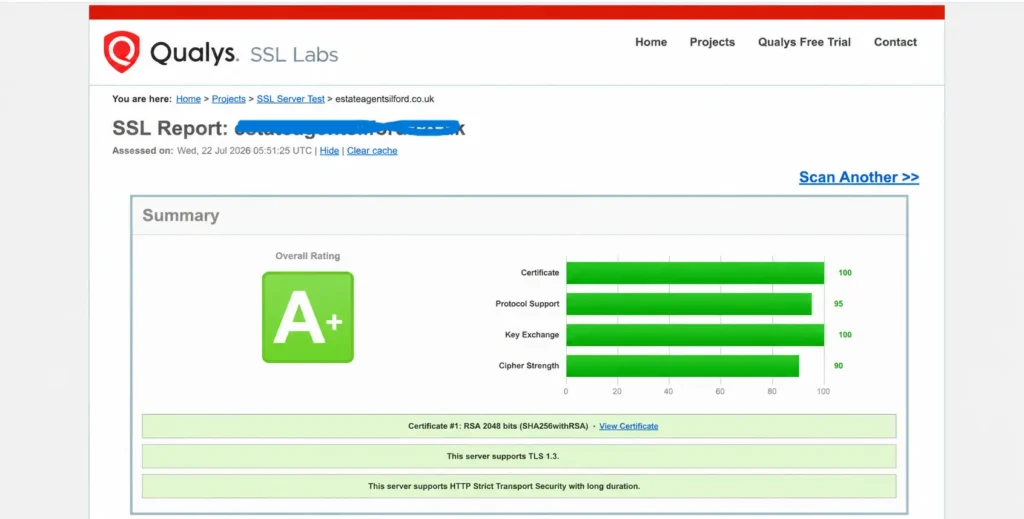
Technical SEO Audit Checklist Point 9: HTTPS & Security
HTTPS is a baseline legal and compliance requirement under UK data protection law. Under the UK GDPR and the Data Protection Act 2018, ICO is explicit that websites collecting any user data, including via contact forms, analytics cookies, or newsletter signups, must transmit that data securely. Running any of those touchpoints over HTTP is a potential ICO compliance exposure, not just an SEO problem. For UK ecommerce sites processing payments, PCI DSS compliance mandates HTTPS across the entire purchase journey.
Older UK business websites that added SSL certificates following Google’s HTTPS ranking signal announcement frequently have mixed content issues. The homepage and main landing pages were cleaned up, but inner pages, blog archives, and legacy content sections still load HTTP assets that predate the migration.
Inspect
- The SSL certificate is valid, correctly installed, and not within 30 days of expiry
- Mixed content errors
- All HTTP URLs redirect permanently (301) to their HTTPS equivalents
- HTTPS redirect applies consistently across the entire site, not just the homepage
- HSTS (HTTP Strict Transport Security) header is implemented and configured correctly
- Forms collecting user data operate over HTTPS
How to fix
Validate your SSL certificate using SSL Labs’ free server test. Run a full site crawl in Screaming Frog with the “Check Mixed Content” setting enabled to surface all HTTP assets loading on HTTPS pages. Enable HSTS by adding the Strict-Transport-Security header to your server configuration, instructing browsers to always use HTTPS for your domain going forward.
Tools
- Chrome DevTools (Security panel)
- SSL Labs Server Test (ssllabs.com/ssltest)
- Screaming Frog SEO Spider
Priority
- High
Technical SEO Audit Checklist Point 10: Core Web Vitals (2026)
Core Web Vitals directly measure real user experience; if your site is slow or visually unstable, rankings and conversions drop even if your content is strong. Cookie consent banners frequently trigger CLS issues on UK websites due to late loading and unreserved space.
Inspect
- Largest Contentful Paint (LCP) loads within 2.5s
- Interaction to Next Paint (INP) is under 200ms
- Cumulative Layout Shift (CLS) stays below 0.1
- Cookie banners are not causing layout shifts
- LCP element is properly optimised (image or hero section)
How to fix
Reserve space for banners, preload LCP images, and reduce render-blocking scripts.
Tools
- Google PageSpeed Insights
- Chrome UX Report
- Lighthouse
Priority
- High
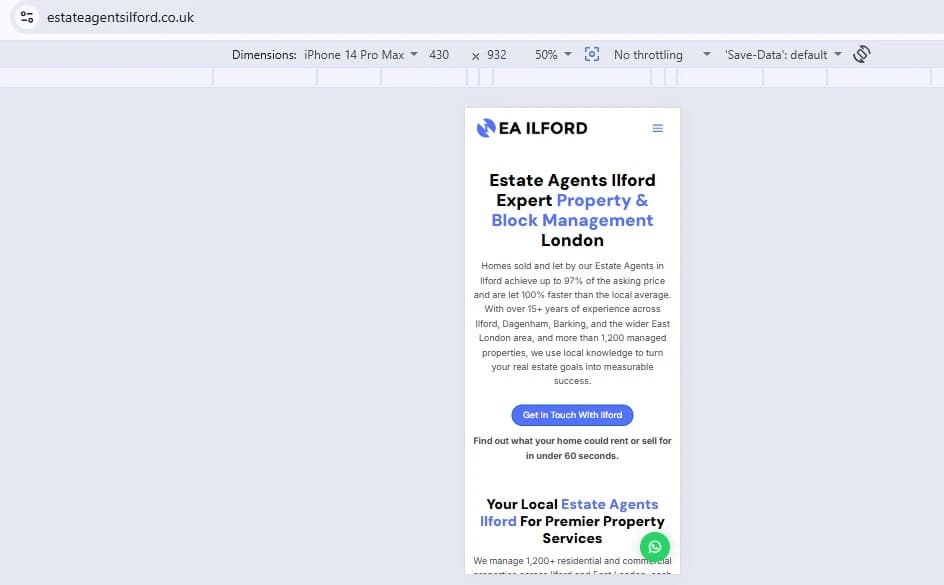
Technical SEO Audit Checklist Point 11: Mobile-First Indexing Readiness
Google has indexed the mobile version of websites first since 2019. It means rankings and efficiency are assessed against what Google sees on mobile. UK sites frequently hide navigation elements, secondary content sections, or trust signals on mobile to simplify the layout, which removes the content from Google’s sight.
Inspect
- Mobile version contains the same content as the desktop version
- Buttons or links are a minimum of 48×48 pixels
- Body font size is at least 16px; otherwise, Google treats it as a usability failure
- Viewport meta tag is correctly set
How to fix
Audit the content parity on mobile and desktop with Screaming Frog and compare the output URL Inspection tool in GSC. Increase tap target sizes with padding. Test on real hardware or BrowserStack’s real device testing for accurate mobile rendering.
Tools
- Google Mobile-Friendly Test
- Chrome DevTools (mobile emulation)
- Google Search Console URL Inspection
Priority
- High
Technical SEO Audit Checklist Point 12: Page Speed & Image Optimisation
Slow pages cost you rankings and revenue; a one-second delay in load time reduces conversions by approximately 7%. Speed is also directly tied to Core Web Vitals, a confirmed ranking factor in 2026. According to current web performance data, approximately 74% of UK websites still serve uncompressed JPEG images for hero banners and above-the-fold content. Also, UK-targeted sites hosted on US servers face an inherent TTFB penalty of ~70ms before a single byte of content has loaded, simply due to transatlantic routing. These issues are overlooked as they require a deep audit.
Inspect
- All images are compressed and served in WebP or AVIF format, avoiding JPEG or PNG where possible.
- Enable lazy loading on below-the-fold images.
- Identify and preload LCP image with both a <link rel=”preload”> tag and fetchpriority=”high” attribute.
- Images are served at the size they are displayed, not scaled down in CSS
- Server response time (TTFB), under 200ms for UK users; if hosted outside the UK/EU, consider migrating or adding a CDN with UK edge nodes
Tools
- Google PageSpeed Insights
- GTmetrix (set test location to London)
- Screaming Frog
Priority
- High
Technical SEO Audit Checklist Point 13: Redirect Audit
Redirects happen all the time when pages are deleted, URLs change, or site migrations occur; the problem arises when these redirects accumulate to create a technical crisis. These redirect chains slow down crawling and bleed link equity, eventually confusing the search engines. Temporary 302 redirects left permanently tell Google the original URL still technically exists, which prevents the consolidating signals from reaching the destination.
UK e-commerce sites run seasonal campaigns every year with dedicated URLs, which are sometimes deleted or show a 404 error after the event. Some UK sites, built on certain CMS platforms, use 302 redirects in place of 301, unless explicitly configured. A 302 redirect tells Google the move is temporary and to retain the original URL in its index, so the ranking signals never fully transfer to the destination.
Inspect
- No redirect chains, every redirect goes directly from origin to final destination
- No redirect loops: URL A does not redirect to URL B, which redirects back to A
- Correct redirect type: 301 for permanent moves, 302 only for temporary ones
- Post-migration orphan pages, URLs existed before migration that never received a redirect, and now return 404
- Seasonal or campaign URLs are correctly handled after the event ends
How to Fix
Crawl the live site with Screaming Frog and export the full redirect report. Identify all chains and collapse them to single-hop redirects. Check redirect types and correct any 302s that should be 301s. Cross-reference your current 404 report in GSC with your pre-migration crawl to find orphan pages. Build a redirect policy for seasonal campaign URLs before the next campaign cycle begins.
Tools
- Screaming Frog SEO Spider
- Ahrefs Site Audit
- Google Search Console (Pages report)
Priority
- High
Technical SEO Audit Checklist Point 14: Structured Data & Schema Markup
Schema helps search engines and AI systems understand your content and improves eligibility for rich results. Sites that use incomplete or incorrect schema formats reduce AI visibility and rich snippet eligibility.
Priority Schema Types for UK Sites
For UK sites, priority schema types depend on your business model. Top universal priorities include Organisation to establish entity authority, and BreadcrumbList for site navigation. E-commerce sites should prioritise Product, Offer, and Review schema. Local businesses must implement LocalBusiness for geo-visibility.
Inspect
- LocalBusiness schema includes the correct UK format (+44, postcode)
- Article schema present for blog content
- Implement the FAQ schema where relevant
- Breadcrumb schema matches site structure
- Product schema validated for e-commerce pages
How to fix
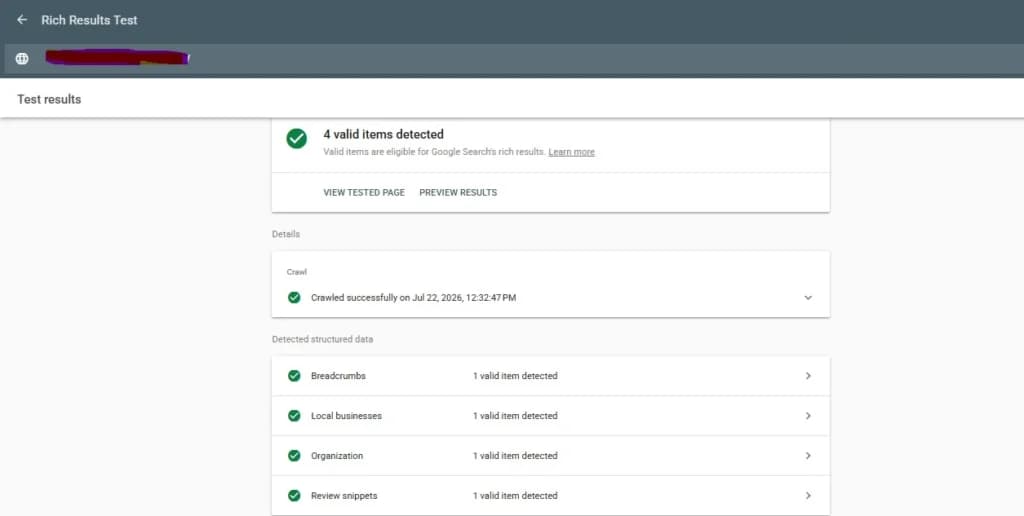
Implement a validated schema using Google Rich Results Test and ensure consistency across all templates.
Tools:
- Google Rich Results Test
- Schema.org Validator
- Screaming Frog
Priority
- High
Technical SEO Audit Checklist Point 15: Hreflang For Uk Sites (Post-Brexit)
Hreflang tells Google which version of your content is intended for which regional audience. If hreflang is done wrong, Google cannot attribute the right content to a region’s audience. Also, Google will consolidate regional variants into a single URL and decide that the hreflang implementation is not trustworthy. It has become a complex phenomenon for UK business sites post-Brexit. Before 2020, many UK sites served a single en-gb hreflang tag, but now companies with audiences in Great Britain, Ireland, and Commonwealth markets need a more deliberate approach.
The en and en-gb mistakes
Using en as an hreflang value tells Google this content is for English speakers globally. Google will frequently serve en pages to the US audience rather than the UK audience, creating a problem for a UK business whose pricing and audience are specifically for the British. The correct tag is en-gb for content targeting Great Britain; if you also serve Ireland, en-ie is a separate tag.
Inspect
- Correct hreflang values for each regional variant
- Every hreflang tag has a matching return tag
- Self-referencing hreflang is present on every page in the international set
- No pages defaulting to en only
- Implementation across all page templates
How to fix
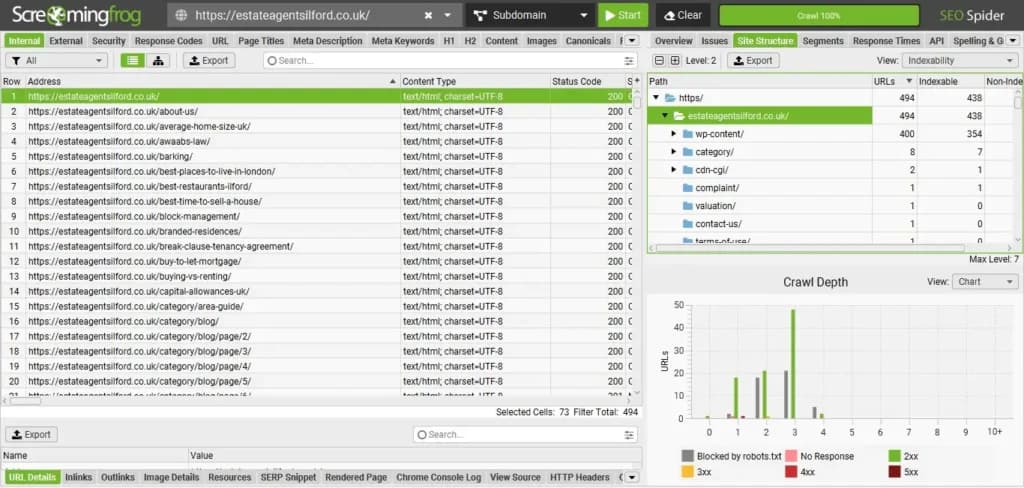
Run a full hreflang audit using Screaming Frog. Fix en tags to en-gb where the content is specifically for UK audiences. Add en-ie tags for any content served to Irish users. Verify plugin output against the actual page source rather than relying on plugin settings screens.
Tools
- Screaming Frog SEO Spider (hreflang report)
- Ahrefs Site Audit
- Google Search Console URL Inspection
Priority
- High
Technical SEO Audit Checklist Point 16: Pagination & Faceted Navigation
The filtering and sorting systems on category/listing pages are called pagination and faceted navigation. They cause index bloat and waste crawl budget on e-commerce and large content sites. If pagination & faceted navigation are not handled properly, a category page with ten filterable attributes can generate thousands of unique URLs. Google will spend the crawling budget on these unnecessary pages rather than your actual product and content pages. This budget drain is the most common issue in UK ecommerce sites and is difficult to audit as the filter URLs do not appear in the sitemap.
Inspect
- Paginated pages use self-referencing canonical tags pointing to their own URL
- Faceted navigation URLs (filter combinations) are either noindexed or blocked from crawling
- No duplicate filter combinations indexed
- Category pagination handled cleanly with correct canonicals on each page in the series
- The navigation structure is crawlable for link equity flow
How to fix
Use the URL parameters report to identify patterns and apply noindex to filter combinations that add no unique value. Set self-referencing canonicals on all paginated pages and remove rel=prev/next if it is present.
Tools
- Screaming Frog SEO Spider
- Sitebulb
- Google Search Console (URL Parameters report)
Priority
- Medium
Technical SEO Audit Checklist Point 17: Accessibility & WCAG 2.2 (UK Compliance)
Accessibility and SEO often overlap, without being visible in the audits, but for UK websites, accessibility is a legal obligation. The UK Equality Act 2010 requires that businesses make reasonable adjustments to ensure disabled users can access their services. Public sector organisations are legally required to meet WCAG 2.2 AA as of 2024 under the Public Sector Bodies Accessibility Regulations, with mandatory statements and a formal complaint mechanism; the private sector is not held to the same standard, but legal risk exists. Also, the technical requirements of WCAG 2.2 align directly with signals Google uses to evaluate page quality.
Inspect
- All images have descriptive alt text
- Heading hierarchy is logical, with no levels skipped
- Link anchor text is descriptive
- Colour contrast ratios meet WCAG 2.2 AA minimums
- Keyboard navigation works correctly across the site
How to fix
Run an accessibility audit and fix heading hierarchy in your page templates. Enforce alt text policies in your teams. For public sector sites, commission a full WCAG 2.2 AA audit and publish a compliant accessibility statement.
Tools
- WAVE Accessibility Tool (wave.webaim.org)
- Axe DevTools (browser extension)
- Lighthouse (Accessibility audit tab)
Priority
- Medium
Technical SEO Audit Checklist Point 18: AI Visibility & Geo Readiness
Search behaviour is shifting; AI tools like ChatGPT, Perplexity, Gemini, and others are now used as search engines, they cite sources, recommend brands, and even make references to content. Your citation in AI depends on your technical structure more than your content. GEO (Generative Engine Optimisation) is used to structure your website now, so that it becomes discoverable to AI systems.
The issue for UK sites is that their visibility is very low compared to the US sites in AI-generated answers. UK businesses can partially overcome this by using structured data, consistent brand information across all UK business directories, and producing content that AI systems are likely to retrieve and cite directly.
Inspect
- Your brand appears in AI-generated answers for your core service and location queries
- Strong E-E-A-T signals present
- Organisation and person schema are implemented
- AI retrieval bots allowed in robots.txt
- Clear entity associations
How to fix
Add organisation and person schema across your site and ensure the E-E-A-T signals are present. Allow AI retrieval bots in robots.txt and monitor AI visibility quarterly. Audit brand consistency across all online profiles and directories.
Tools
- Google Search Console
- ChatGPT, Perplexity, Google Gemini (manual brand queries)
- Google Rich Results Test (schema validation)
- Screaming Frog (schema audit)
Priority
- High
Conclusion
In SEO, the technical part is often taken for granted as all the focus is on content, on-page or link building. What businesses need to understand is that they can invest all they want in marketing or other aspects of SEO, but if there are technical SEO errors in their website, all will go in vain. They need to invest more time, money and effort into beating their competitors; a technical SEO audit checklist will come in handy for pointing out the errors.
Running an audit for technical SEO in UK sites is more important and different from any other region’s website. This is because not everyone can handle the things added in this technical SEO audit checklist for UK sites; there are ICO compliance, WCAG 2.2 compliance, post-Brexit systems and much more that a general or global SEO agency may fail to understand.
At 360 Web Solutions, we do not treat them as a general audit; we understand your business, goals and the UK policies to improve your site’s rankings.